
If you want your listings to rank higher in eBay search and get more traffic and sales, keyword research is the cornerstone of your strategy. Without understanding what buyers are searching for, even the best product won’t get clicks. That’s where keyword research becomes essential for strong SEO for eBay listings.
At its core, eBay keyword research is about identifying the specific search terms real buyers use when looking for products like yours—and then strategically using those terms in your title, item specifics, and description. The more aligned your listing is with buyer search intent, the more often it will surface in search results.
Why Keyword Research Matters for eBay SEO
Unlike typical on-site SEO, where search engines like Google crawl web pages based on complex backlinks and authority metrics, eBay’s search algorithm (Cassini) primarily prioritizes relevance—how closely your listing matches what the buyer is actually searching for. The right keywords help the algorithm understand your item’s context so it can show your listing to the right shoppers.
Here’s why keyword research is critical:
Improved visibility in search results by matching buyer search queries
Higher impression counts, leading to more clicks
Better conversion potential as buyers find exactly what they’re looking for
Insight into buyer language, revealing how shoppers think and search
Where to Find eBay Keywords
There are several methods and tools you can use to research effective eBay keywords:
eBay Search Autocomplete
Start typing your main product term into the eBay search bar. The autocomplete suggestions that appear are actual search queries being used by buyers. These give real insight into what buyers are searching for right now.
For example, if you type “wireless earbuds”, eBay might suggest “wireless earbuds Bluetooth noise cancelling”—a long-tail keyword you can incorporate into your title and description.
Dedicated eBay Keyword Tools
Several tools can help you uncover search behavior and trending keywords. Examples include keyword tools that pull data directly from eBay’s search patterns, giving you a mix of high-volume and long-tail terms to target. Some tools also estimate search volumes and trends so you can prioritize the most relevant terms.
Terapeak (eBay’s Market Research Tool)
If you’re a store subscriber or willing to pay for Terapeak, you can access data on keyword search volume, average prices, sell-through rates, and competition. This helps you identify profitable keywords with demand and reasonable competition.
Competitive Analysis
Study the top-performing listings in your niche. Look at the keywords they use in titles and item specifics. While you shouldn’t copy them outright, this can give you ideas for relevant phrases that drive traffic.
Types of Keywords to Target
Successful eBay sellers use a mix of different keyword types:
Primary Keywords – Core search terms that describe your item (e.g., iPhone 13 Pro Max)
Long-Tail Keywords – More specific phrases with lower competition (e.g., iPhone 13 Pro Max 256GB unlocked)
Attribute Keywords – Condition or variant words like new, used, vintage, bundle
Buyer-Intent Keywords – Terms that indicate purchase intent, like discount, genuine, authentic
Using a combination of these helps you capture a broader range of search queries while still staying relevant to the buyer’s intent.
Applying Your Keywords Effectively
Once you’ve identified the best keywords, they should be incorporated strategically throughout your listing:
Title: This is the most important place for keywords. Make each word count.
Item Specifics: Fill out every relevant field (brand, model, size, color, condition, etc.)—these act like hidden keywords that improve searchability.
Description: Use secondary keywords naturally in sentences without stuffing.

Your eBay listing title is the single most important factor in eBay SEO—it’s the first thing buyers and the search algorithm see, and it directly influences whether your item gets shown in search results. Optimizing titles effectively helps your listings appear in more relevant searches, improves click‑through rates, and drives more sales.
Here’s how to craft eBay titles that both buyers and eBay’s search engine love:
Use the Full 80‑Character Limit Wisely
eBay allows up to 80 characters in the title. While you don’t always have to reach the maximum, the more relevant, high‑value keywords you include (without stuffing), the better your chances of showing up in multiple search queries.
Expert tip: begin with the most important keywords—brand and product name—then add specifications like size, color, model number, or condition.
Put Your Best Keywords First
Search engines like eBay’s Cassini often prioritize the first few words of your title when determining relevance. Placing primary keywords at the beginning signals to both buyers and the algorithm exactly what your product is.
For example:
Nike Air Max 270 Men’s Running Shoes Size 10 Black/White
instead of
Great Shoes – Nike Air Max
Be Descriptive and Specific
Clarity beats creativity when it comes to SEO. Your title should clearly describe what you’re selling, including attributes buyers expect to see, such as:
Brand
Model or series
Size or variant
Color
Condition (e.g., New, Used)
A descriptive title not only helps eBay understand your product but also makes it easier for buyers to find it.
Avoid Keyword Stuffing and Fillers
While you want to include keywords, avoid keyword stuffing—cramming keywords unnaturally into the title just to increase reach. It can make your title hard to read and may even harm your search ranking.
Also steer clear of generic filler words like “Best,” “Great deal,” or “Cheap.” These don’t add searchable value and take up characters that could be used for meaningful terms.
Use Buyer‑Friendly Language
Write titles in the same way buyers search. Many sellers make the mistake of using internal codes, acronyms, or jargon that buyers don’t use. Instead, use common, straightforward terms that match buyer intent.
For example, “Running Shoes Men Size 10” is more intuitive than “NWT RngShs M 10”—and it gets better search visibility.
Include Key Product Attributes
Certain product features are often used as search filters on eBay. Including these in your title helps your listing appear in those filtered results. Common attributes to include:
Size
Color
Model number
Version
Material
For example, “Apple iPhone 13 Pro Max 256GB Unlocked Silver” gives buyers and eBay’s algorithm a full picture of the product.
Avoid Special Characters and All Caps
Titles written entirely in ALL CAPS or with excessive punctuation (like “!!!” or “***”) may be seen as spammy, reduce readability, and make buyers less confident. Always use standard title casing instead.
Look at Competitor Titles for Inspiration
Before finalizing your title, check out top‑ranked listings for similar products. While you shouldn’t copy them verbatim, competitor titles can give you insights into keyword structure and phrasing that perform well.

Your eBay listing description plays two critical roles: it helps your item rank higher in eBay search and persuades buyers to hit the “Buy” button. While titles and item specifics are often the biggest SEO drivers, a well‑written description supports both search visibility and conversion by giving buyers the detailed information they need.
Here’s how to write SEO‑optimized eBay product descriptions that are clear, compelling, and designed to convert:
Write for Buyers First, SEO Second
Your primary goal should be to answer buyer questions and eliminate purchase hesitation. Search engines like eBay’s Cassini also read your description, so naturally including relevant keywords helps both buyers and SEO.
Best practice: Use keywords from your research (such as brand, product type, model, color, size, and condition) in natural language—don’t force them.
Start With a Clear Product Overview
Open your description with a concise summary that tells buyers:
What the item is
Key features and benefits
Why it’s valuable or unique
This helps buyers quickly understand the product and signals relevance to eBay’s algorithm early in the text.
Example:
“This Canon EOS Rebel T7 DSLR Camera comes with an 18‑55mm lens, perfect for beginners and enthusiasts. Enjoy high‑quality 24.1MP images and easy‑to‑use autofocus.”
Use Structured, Easy‑to‑Read Content
Long blocks of text are hard to scan. Break your description into sections and use formatting techniques such as:
Bullet points for key specs (size, color, model, features)
Short paragraphs for readability
Headers or bold text for important sections
This not only improves readability but also helps eBay and buyers quickly parse important information.
Explain Features and Benefits
Many sellers list features without explaining why they matter to buyers. A compelling description emphasizes how the product helps the buyer:
Feature: 25‑mile range on a single charge
Benefit: Perfect for long daily commutes without frequent recharging
This approach increases buyer confidence and conversions.
Highlight Condition & Specific Details
Be transparent about the item’s condition, especially for used or vintage products. Buyers value accuracy and clarity—which can reduce returns and negative feedback. Include:
Condition (new, used, refurbished)
Any noticeable flaws or unique characteristics
Measurements and compatibility details (if applicable)
Accurate descriptions build trust and reduce buyer hesitation.
Include Keywords Naturally
Your researched keywords should appear in the description—but in context. Avoid keyword stuffing, which can harm readability and reduce conversions. For example, instead of repeating keywords awkwardly, naturally weave them into sentences like:
“This women’s running shoe features a breathable mesh upper and lightweight cushioning for enhanced comfort.”
According to eBay’s own optimization guidance, relevant search terms should be sprinkled throughout your copy—without overuse.
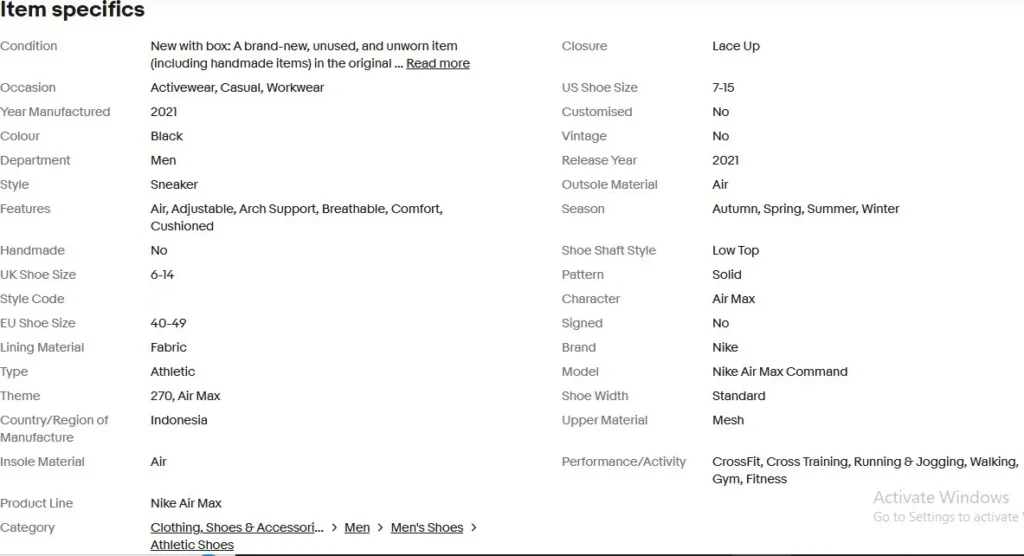
Optimizing your item specifics and selecting the right category are two of the most impactful steps you can take to improve your eBay SEO and boost your listings’ visibility. These elements help both buyers and eBay’s search engine quickly understand what you are selling—resulting in better placement in search results and more relevant traffic to your listings.
Why Item Specifics and Categories Matter for eBay SEO
Item specifics are structured data fields (like brand, size, color, model, etc.) that describe your product in detail. eBay uses these fields to:
Improve search relevance and filtering
Help buyers refine searches using filters on search results pages
Match listings to buyer queries more accurately
If you leave item specifics empty or incomplete, your listing may not appear when buyers use filters or narrow down search results—severely limiting visibility and reducing potential sales.
Category selection similarly helps eBay understand where your product belongs and which shoppers are most likely to see it. Choosing the correct category ensures your listing surfaces in the right search and browse contexts.
Item Specifics Optimization Best Practices
Fill Out All Relevant Item Specifics
When creating a listing, eBay shows different item specifics depending on the category you choose. Always complete all required and recommended fields—especially those that buyers commonly filter by, such as Brand, Size, Color, Model, Material, and Condition.
Why this matters:
Buyers often use filter options on the left side of search results—each filter is based on an item specific. If your listing lacks the “Brand” field, it won’t appear when a buyer filters by brand.
Use eBay’s Suggested Values When Available
Whenever eBay provides predefined values (e.g., a dropdown for “Color”), choose those instead of typing your own unique text. eBay’s recommended values are indexed more consistently in search and lead to better discoverability.
Best practice:
✔ Choose standard values like Black, Nike, XL instead of custom text like “Blk” or “Brand New!”
✔ Use dropdown suggestions to maintain consistency across similar listings.
Enter Accurate Product Identifiers
Whenever possible, include global identifiers like:
UPC (Universal Product Code)
EAN/GTIN (European/Global Trade Item Number)
ISBN (book identifier)
MPN (Manufacturer Part Number)
These codes help eBay and external search engines (like Google) match your product to searches and comparable listings. Including exact identifiers increases search visibility and buyer confidence.
Complete as Many Item Specifics as Possible
Some categories support 15–50 or more item specifics, depending on the product type. Filling out all applicable fields can significantly improve search rankings and traffic, especially for mobile or filtered searches.
Pro Tip: Electronics listings benefit from detailed specifics like screen size, processor type, and storage; clothing listings should include material, style, and fit.
Use Buyer‑Friendly Language
When entering values, use terminology that buyers are likely to search for. Avoid abbreviations or internal codes that aren’t consumer‑friendly. For example:
Black Leather Jacket is better than Blk Lthr Jckt
32GB iPhone Case is better than 32GB Case
 High‑quality product images aren’t just nice to have—they’re essential for eBay SEO and conversions. Images help your listings stand out in search results, increase click‑through rates (CTR), and build buyer confidence. Listings with professional visuals are proven to attract more attention and sales than those with blurry or incomplete photos.
Here’s how to optimize your eBay images effectively in 2026:
Use High‑Quality Images That Meet eBay’s Requirements
eBay has clear technical requirements for images that also influence SEO:
Minimum size: At least 500 pixels on the longest side
Recommended size: Around 1,600 x 1,600 pixels for better clarity and zoom support
Accepted formats: JPEG, PNG, GIF, TIFF, BMP (JPEG is most common)
File size: Up to 7 MB per photo
Good resolution helps buyers see details—and gives eBay’s algorithm more signals that your listing is professional and relevant.
Upload Multiple Angles and Detail Shots
eBay allows up to 12 photos per listing, and using more of these slots can boost overall visibility and sales potential because:
Buyers stay engaged longer when they see thorough imagery
Multiple angles reduce uncertainty and returns
Listings with more images often rank higher because they signal completeness to eBay’s search engine
Best practice:
First image should clearly show the entire product
Include close‑ups of features, labels, or brand marks
Show the item from different sides and perspectives
Use Clean Backgrounds and Proper Lighting
Your first image—the one that appears in search result thumbnails—must focus on the product without distraction. A plain white or neutral background helps the item stand out and looks professional. Avoid busy or cluttered settings that can distract buyers.
Lighting tips:
Use soft, diffused lighting to eliminate harsh shadows
Natural daylight often works best for clear, realistic color rendering
Avoid on‑camera flash that creates glare or uneven lighting
Accurately Represent Your Product
Federal guidelines and eBay policy require that images accurately reflect the item being sold. Misleading visuals can hurt buyer trust and lead to returns or negative feedback. Use real photos for pre‑owned or unique items instead of generic stock photos.
Avoid Watermarks, Borders, and Text Overlays
eBay prohibits:
Watermarks
Promotional text on photos
Borders or graphics unrelated to the product
These elements distract buyers and may even limit visibility in search results or external search engine listings.
Optimize for Mobile Viewing
Most eBay shoppers now browse on mobile devices, so ensure your images look sharp on small screens. Keep the product centered, use consistent framing, and check your listing on mobile before publishing.
Include Context and Scale When Relevant
For some categories—especially fashion, accessories, or household goods—contextual photos help buyers understand size and use. For example:
Show clothing on a mannequin or model
Show electronics with accessories
Include measurements or a reference object
These context shots improve user experience and can indirectly enhance your SEO by increasing engagement and conversions.
Leveraging Price Competitiveness and Shipping Strategies
Price is one of Cassini’s most influential ranking factors because it directly affects how buyers make purchasing decisions. However, offering the lowest item price alone isn’t enough. Cassini evaluates overall price competitiveness as part of the complete offer, factoring in not only the item cost but also shipping speed and shipping price as they relate to each buyer’s location.
Listings that offer free shipping often receive a ranking boost, as Cassini prioritizes options that deliver a better buyer experience. If free shipping isn’t possible, it’s critical to keep shipping costs competitive, clearly communicated, and paired with the fastest possible handling and delivery times. Whenever feasible, aim to qualify for eBay’s Fast ’N Free badge, which rewards listings that provide free shipping and ship within one business day. Sellers who consistently meet these criteria typically see noticeable improvements in search visibility and ranking performance.